Microsoft 365 and Office | Word | For business | Windows
A family of Microsoft word processing software products for creating web, email, and print documents.

This browser is no longer supported.
Upgrade to Microsoft Edge to take advantage of the latest features, security updates, and technical support.
' cx='32' cy='32' r='32' /%3E%3Ctext x='50%25' y='55%25' dominant-baseline='middle' text-anchor='middle' fill='%23FFF' %3EMG%3C/text%3E%3C/svg%3E)
Hello,
I’ve had a Microsoft 365 Family subscription for years. I have installed and used Microsoft Word on my laptop all that time. When I previously opened a new, blank Word document a literally blank document open (as it should). One day, a few months ago, that changed, and I can’t figure out why or how to fix it to go back to the way it should be.
KEY POINTS OF THIS MICROSOFT WORD ISSUE:
The following is what happens when I use Microsoft word now. I open Microsoft Word on my laptop and select: File New Blank document
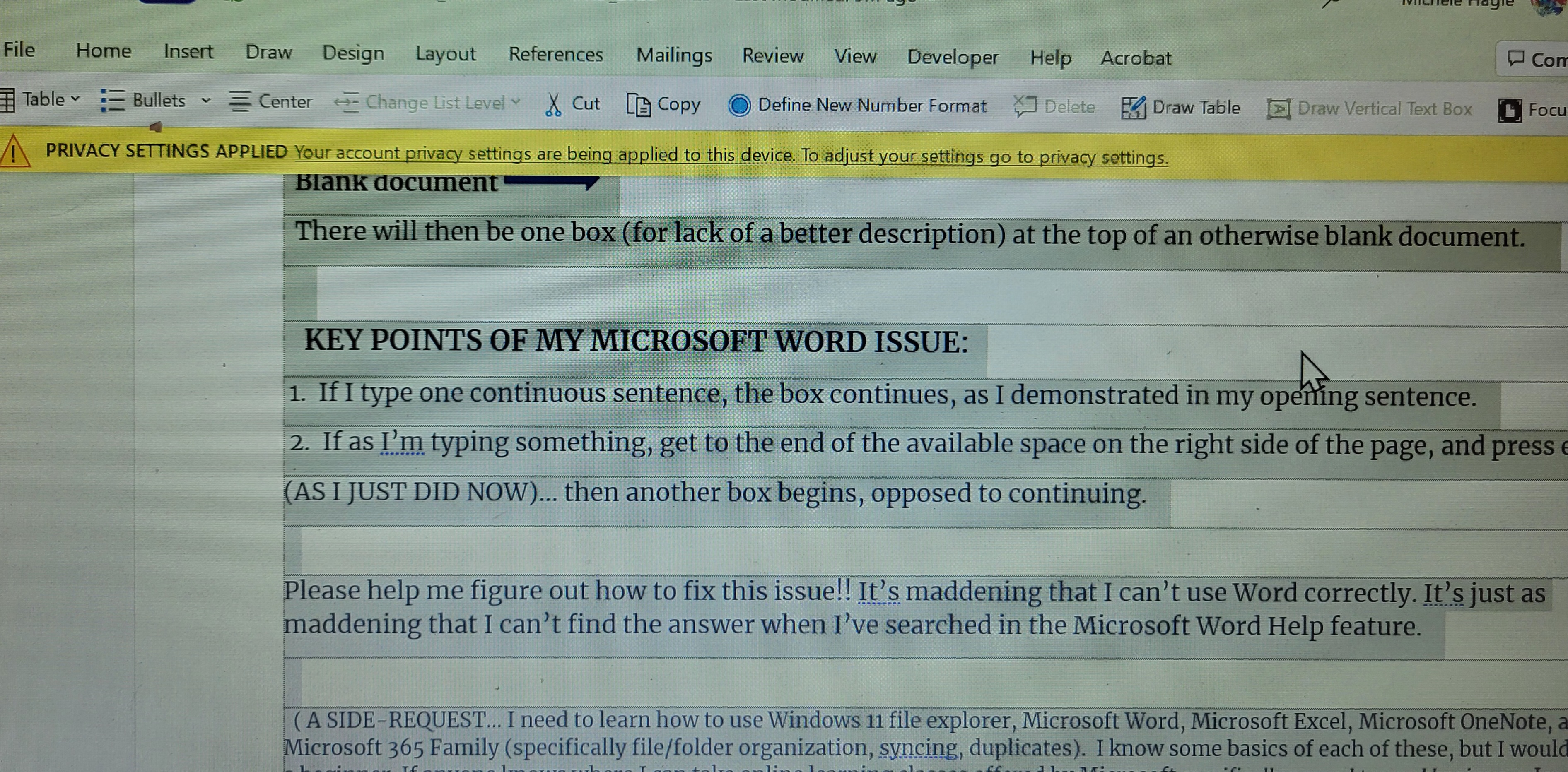
There will then be one box (for lack of a better description) at the top of an otherwise blank document.
Please help me figure out how to fix this issue!! It’s maddening that I can’t use Word correctly. It’s just as maddening that I can’t find the answer when I’ve searched in the Microsoft Word Help feature.
Thank you… I greatly appreciate any input, michael-grace
Locked Question. You can vote on whether it's helpful, but you can't add comments or replies or follow the question.

Can you post a screenshot of what you see please?
' cx='32' cy='32' r='32' /%3E%3Ctext x='50%25' y='55%25' dominant-baseline='middle' text-anchor='middle' fill='%23FFF' %3EKV%3C/text%3E%3C/svg%3E)
Right click within the box and click on "Remove Content Control". If it doesn't remove on the first attempt, click elsewhere within the box and right click, Remove Content Control until the box goes away.

Your screen shot shows that the Text Boundaries option is turned on:
I agree with @John Korchok , please try his steps to remove the text boundaries
Here is my test that looks like your screenshot:


Hi, @michael-grace108
Is your problem solved?
' cx='32' cy='32' r='32' /%3E%3Ctext x='50%25' y='55%25' dominant-baseline='middle' text-anchor='middle' fill='%23FFF' %3EMK%3C/text%3E%3C/svg%3E)
It worked... Thank you 👍
' cx='32' cy='32' r='32' /%3E%3Ctext x='50%25' y='55%25' dominant-baseline='middle' text-anchor='middle' fill='%23FFF' %3EGC%3C/text%3E%3C/svg%3E)
Holy cow, thank you so much. I was going nutty trying to figure out 1, how this happened, and 2, how to get rid of it. THANK YOU!
' cx='32' cy='32' r='32' /%3E%3Ctext x='50%25' y='55%25' dominant-baseline='middle' text-anchor='middle' fill='%23FFF' %3EBK%3C/text%3E%3C/svg%3E)
Why would I have turned that "Feature" on?
Most likely, Normal style in Normal.dotm has borders applied to it. Please try these steps:
' cx='32' cy='32' r='32' /%3E%3Ctext x='50%25' y='55%25' dominant-baseline='middle' text-anchor='middle' fill='%23FFF' %3EB%3C/text%3E%3C/svg%3E)
Screenshot 2024-02-01 161932.pngI have similar issue but the steps are not working for mine
' cx='32' cy='32' r='32' /%3E%3Ctext x='50%25' y='55%25' dominant-baseline='middle' text-anchor='middle' fill='%23FFF' %3EGM%3C/text%3E%3C/svg%3E)
Thank you John. Next problem..can't get images to display? Regards, Gwenda
Have you tried pasting the pictures separately instead of together with the text? When you wrote about "uploading images" are you referring to placing pictures from your hard disk in a Word file? Or are these online pictures? If you post the specific steps you are using, we can give you a better answer.

Turn off display of Text Boundaries.
https://addbalance.com/word/textBoundaries.htm#PageStart
This answer has been deleted due to a violation of our Code of Conduct. The answer was manually reported or identified through automated detection before action was taken. Please refer to our Code of Conduct for more information.
1 deleted commentComments have been turned off. Learn more
Hello, I'm also having trouble with boxes showing up every time I press return. I tried to follow instructions from Year 2022 questions but I can't even find an File - Options - Advanced let alone
'Remove Content Control' ? I'm stuffed. Tried Microsoft phone Support but I could hardly understand the person trying to help me..not sure of their country of origin, but it was very difficult so I had to five up. Yes, I am pretty bad at technical stuff although I've taught myself Word from the get go over the years. But now I have this Box issue and I also can't upload images anymore direct from my Desktop?
I'm on the look out for an alternative to Microsoft Word 365 because this is insane. If anyone can help me ...without technical speak..that would be great. Thanking you, Gwenda in Oz

Hello, I'm also having trouble with boxes showing up every time I press return. I tried to follow instructions from Year 2022 questions but I can't even find an File - Options - Advanced let alone
Gwenda,
If you are seeing "borders" like in the screen shot from Michael earlier in this thread, you need to turn off text boundaries. In Word for Windows, you do that via File > Options > Advanced. If you are running Word for Mac, click Word > Preferences > View.

As Stefan says, the path to the dialog is different in Word for Mac than in Word for Windows. But if you are on Windows, there's another possible answer: If your Word window isn't tall enough to show the entire menu under the File tab, there will be a More... entry at the bottom. Click that to display the rest of the menu items, like this.