Hi @Syed Muhammad Hassan Gillani,
Thank you for reaching out, and I appreciate the clear explanation of your situation. I understand how important it is for your group members to receive timely notifications when tasks are assigned in Microsoft Planner, especially in a collaborative academic environment.
Please try the following steps:
1/ Notification Settings in Planner and Microsoft 365
Planner sends email notifications based on user preferences and group settings. Please ensure:
- The assigned member has not disabled Planner notifications in their Microsoft 365 account.
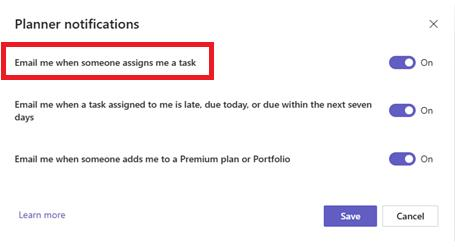
- They can check this by going to https://planner.microsoft.com → Settings (gear icon) → Notifications.
- Ensure the option “Email me when someone assigns me a task” is checked.
2/ Email Delivery Issues
Sometimes, emails may be:
- Filtered into Junk/Spam folders
- Blocked by mail rules or quarantine policies (especially in university-managed accounts)
Ask the user to:
3/ Group Membership and Permissions(Admin Right Required)
Even if a user is added to a plan, they must be a member of the associated Microsoft 365 Group to receive notifications.
- Please verify that the user is listed as a member of the group in Outlook Groups or Microsoft 365 Admin Center.
- If they were added only within Planner and not to the group itself, they may not receive emails.
4/ Delayed or Batched Notifications
Planner may batch notifications or delay them slightly to reduce email volume. If the task was assigned recently, it may take a short while to arrive.
5/ University IT Policies or Customizations
Since you're using a school account, your storage quota is managed by your institution. If the issue continues after trying the above workarounds, I highly recommend contacting your school's IT administrator to:
- Notification emails are disabled or redirected by tenant-level policies.
- Custom mail flow rules are in place that affect Planner notifications.
As a Microsoft moderator, I unfortunately don’t have access to your institution’s internal settings or administrative controls due to privacy and policy restrictions, but I will do my best to assist you in any way I can.
' cx='32' cy='32' r='32' /%3E%3Ctext x='50%25' y='55%25' dominant-baseline='middle' text-anchor='middle' fill='%23FFF' %3ESM%3C/text%3E%3C/svg%3E)

' cx='32' cy='32' r='32' /%3E%3Ctext x='50%25' y='55%25' dominant-baseline='middle' text-anchor='middle' fill='%23FFF' %3ECD%3C/text%3E%3C/svg%3E)