Dear @Meskas, Constantino
Good day! Thank you for posting your question in the Microsoft Q&A forum.
I’m here to assist with your problem
First, please don't worry, I try my best to help you.
So why you can’t see Microsoft Project in Azure? Because that Microsoft Project is not part of the default Azure subscription (including Azure for Students). It’s a separate product and requires its own license. If you’re using an education or student subscription, Project and Visio are typically not included in the free software list.
Generally, Project you won't see an option to install it unless you have an assigned license.
I would like to confirm whether you have the correct Project Desktop license. As Project Online Essentials doesn't include a desktop version of Project, so no installation is required. If you are using Project Online Professional, Project Online Premium, Project Standard or Project Professional (non-subscription versions), you can install Project desktop client.
As Microsoft project is a separate subscription from them, so we need to go to Apps & devices to install it.
If you have project desktop assigned a license, and then log this account into www.office.com to download and install project,
If your organization uses volume licensing, IT can deploy Project using the Office Deployment Tool with a configuration file specifying ProjectPro2024Volume or ProjectStd2024Volume: Deploy Office LTSC 2024 - Office | Microsoft Learn
First, please access https://portal.office.com/account, click View apps & devices, check whether there is a button to install project. Or from office.com select Install Office and select the link "Other install options">from the My Account page, select Apps & devices.
For your reference screenshot:
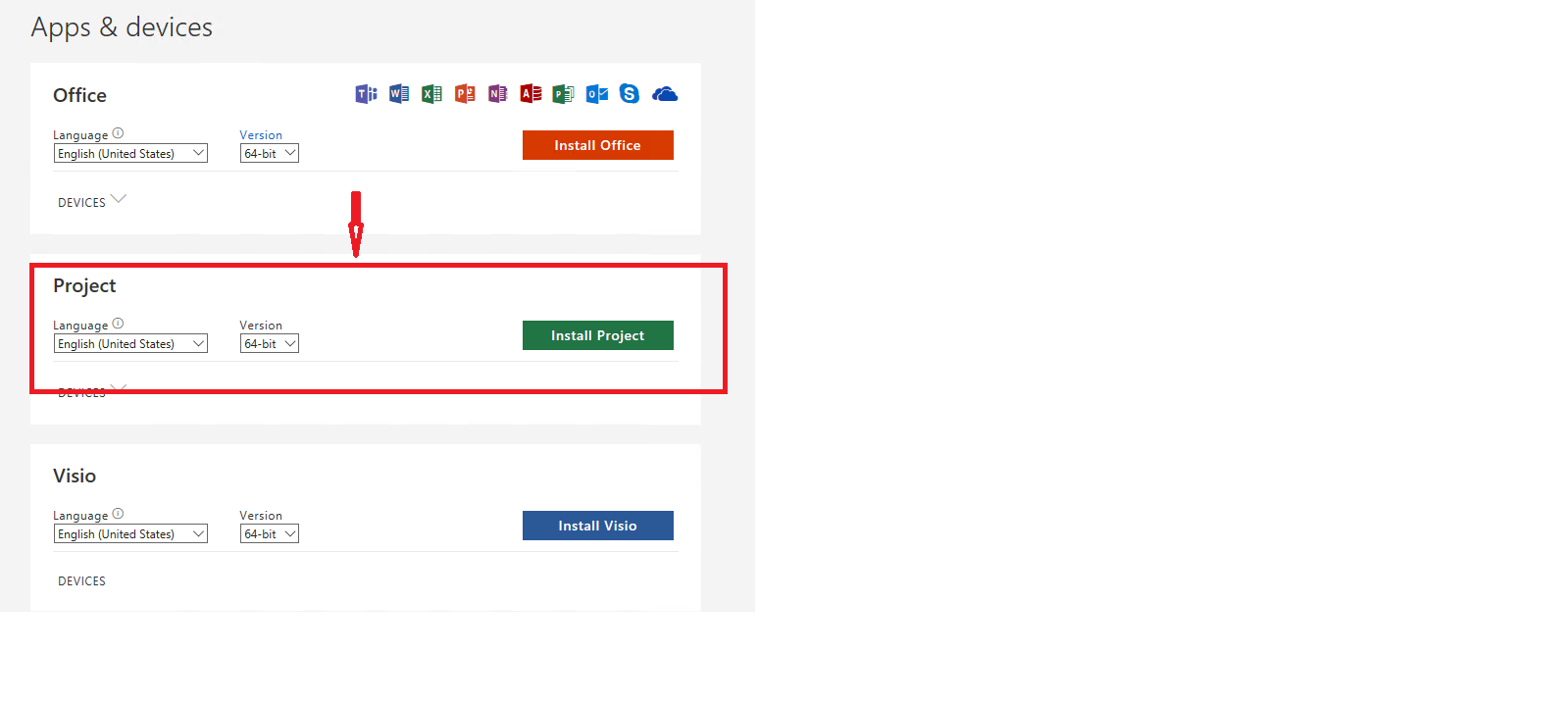
Note: If project isn't listed as an install option under Apps & devices, it could mean you don't have a license or you have Microsoft project assign license which doesn't include the desktop version of project. E.g., Project Online Essentials doesn't include a desktop version of Project.
Meanwhile, if possible, could you please upload a screenshot of the Apps & devices page for us? so we can understand your exact scenario and provide our suggestion in a productive manner, perhaps some related screenshots will be helpful.
Also, please verify that your assigned license. The exact name of the subscription, what is it?
- Project Online Essentials
- Project Online Professional
- Project Online Premium
You can refer to related article: Install Project - Microsoft Support
Your understanding and patience will be highly appreciated. I hope that you are keeping safe and well!
We appreciate your kind patience and understanding that sometimes the initial response may not immediately resolve the issue or there may be some misunderstandings about your scenario, but we would love to hear updates from you and find out further suggestions.
If the answer is helpful, please click "Accept Answer" and kindly upvote it. If you have extra questions about this answer, please click "Comment".
Note: Please follow the steps in our documentation to enable e-mail notifications if you want to receive the related email notification for this thread.

' cx='32' cy='32' r='32' /%3E%3Ctext x='50%25' y='55%25' dominant-baseline='middle' text-anchor='middle' fill='%23FFF' %3EMC%3C/text%3E%3C/svg%3E)


' cx='32' cy='32' r='32' /%3E%3Ctext x='50%25' y='55%25' dominant-baseline='middle' text-anchor='middle' fill='%23FFF' %3EA%3C/text%3E%3C/svg%3E)
' cx='32' cy='32' r='32' /%3E%3Ctext x='50%25' y='55%25' dominant-baseline='middle' text-anchor='middle' fill='%23FFF' %3EKE%3C/text%3E%3C/svg%3E)