Dear @Addison Chan,
Welcome to Microsoft Q&A forum.
Based on the guide you provided, it looks like you're trying to access Planner Power App to import a .mpp file. Please follow the steps below to find the Planner Power App:
- Go to https://planner.cloud.microsoft/ and sign in.
- Click the App Launcher (the square of dots at the top-left corner of the page).
-
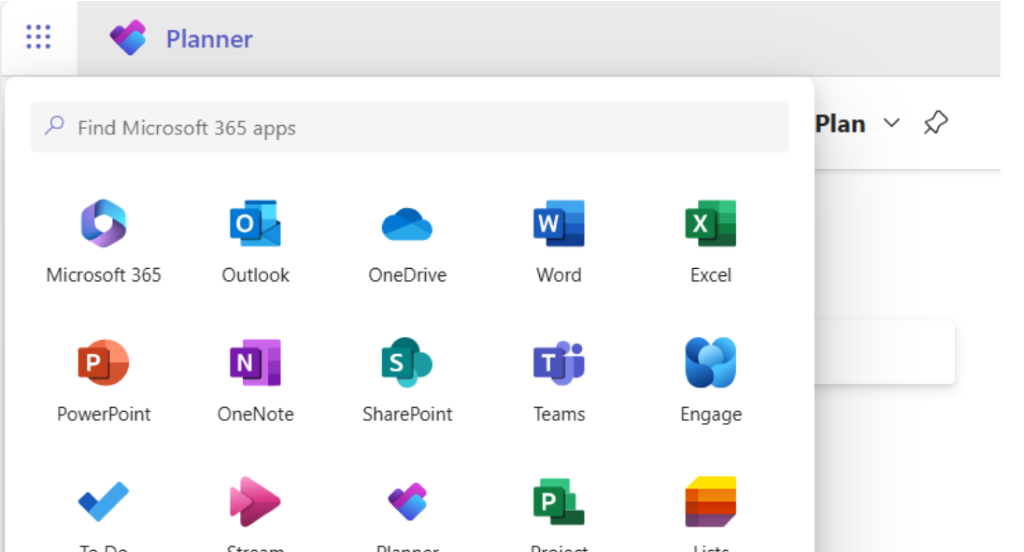
- In the search bar, type Planner.
- You will see two Planner options:
- The first is the standard Microsoft Planner.
- The second includes your environment (default) is the Planner Power App.
-
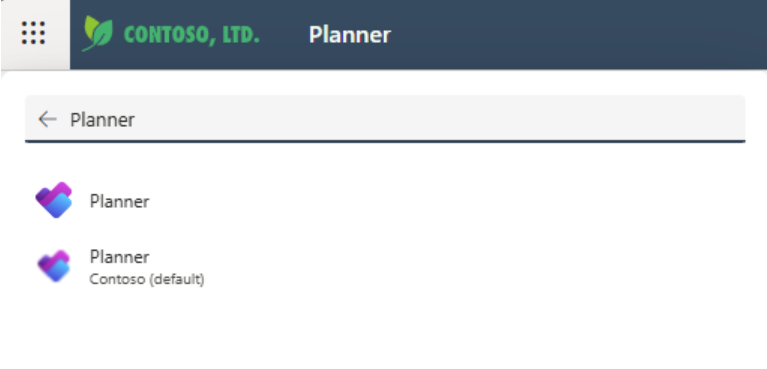
- Please select the second Planner (with your environment name) so you will be able to continue the process with importing .mpp files.
For reference, you may check the Microsoft Support article: Get Started with Planner Power App - Microsoft Support.
Kindly try these steps, and if you encounter any issues or have further concerns, feel free to let us know. Thank you so much!
' cx='32' cy='32' r='32' /%3E%3Ctext x='50%25' y='55%25' dominant-baseline='middle' text-anchor='middle' fill='%23FFF' %3EAC%3C/text%3E%3C/svg%3E)

' cx='32' cy='32' r='32' /%3E%3Ctext x='50%25' y='55%25' dominant-baseline='middle' text-anchor='middle' fill='%23FFF' %3EDV%3C/text%3E%3C/svg%3E)
' cx='32' cy='32' r='32' /%3E%3Ctext x='50%25' y='55%25' dominant-baseline='middle' text-anchor='middle' fill='%23FFF' %3END%3C/text%3E%3C/svg%3E)
' cx='32' cy='32' r='32' /%3E%3Ctext x='50%25' y='55%25' dominant-baseline='middle' text-anchor='middle' fill='%23FFF' %3EAC%3C/text%3E%3C/svg%3E)