Hi @JAD Admin
Thank you for posting your question in Microsoft Q&A.
We understand that you are considering adding another account to a Distribution List group in your tenant. Based on your description, it appears that you are using a personal or business account that is not part of the same tenant.
You could follow these steps:
Add contact in your tenant:
Go to the Microsoft 365 Admin Center.
In the left pane, navigate to Users -> Contacts.
Select Add a contact, then enter the account information.
Click Add to save the contact.
Wait approximately 10 minutes for the changes to sync.

Add a contact to a Distribution List:
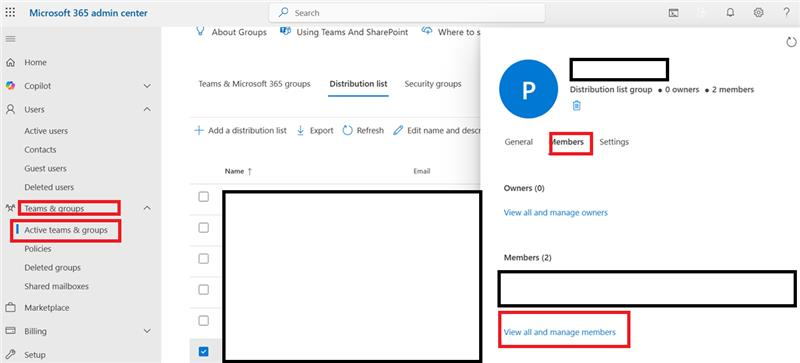
Go to Team&Groups in -> Activeteam&Groups
Select the Distribution List you want to update.
Click Members -> View all and manage members -> Add members.
Choose the Mail Contact you just created.
Please feel free to correct me if I misunderstood your request. If you have any additional concerns, feel free to comment below. I would be more than happy to assist.
If the answer is helpful, please click "Accept Answer" and kindly upvote it. If you have extra questions about this answer, please click "Comment".
Note: Please follow the steps in our documentation to enable e-mail notifications if you want to receive the related email notification for this thread.
' cx='32' cy='32' r='32' /%3E%3Ctext x='50%25' y='55%25' dominant-baseline='middle' text-anchor='middle' fill='%23FFF' %3EJA%3C/text%3E%3C/svg%3E)
' cx='32' cy='32' r='32' /%3E%3Ctext x='50%25' y='55%25' dominant-baseline='middle' text-anchor='middle' fill='%23FFF' %3EHV%3C/text%3E%3C/svg%3E)