Clarification Required on Windows Update History and Registry Status

Haritha Duraisamy 0 Reputation points
2025-12-03T15:12:59.8433333+00:00

Hi Team,
My system is running Windows 11 24H2, and I need clarification regarding the discrepancy between Windows Update history and the registry status.

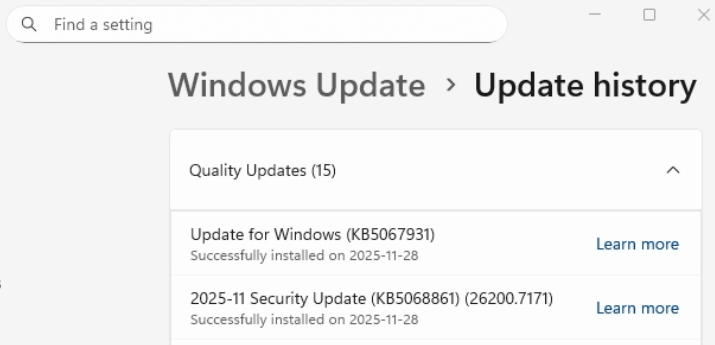
I installed the KB5068861 update via Windows Update, and the update history shows it as installed. However, the CurrentState value in the registry remains 60 (Install Pending) even after the system has been rebooted.

According to the Microsoft article:
https://v4.hkg1.meaqua.org/en-us/archive/blogs/tip_of_the_day/tip-of-the-day-cbs-servicing-states-chart-refresher
the value 60 (Install Pending) is not considered a successful installation.

Previously, I encountered a similar case where the state value remained 60, and I found related errors in the Event Viewer logs. Hence, I assume this update might not have been installed properly.

Could you please help me understand why Windows Update history marks the update as installed even though the registry state is still 60 (Install Pending)?

Windows Update History screenshot:
User's image

CBS.reg:

[HKEY_LOCAL_MACHINE\SOFTWARE\Microsoft\Windows\CurrentVersion\Component Based Servicing\Packages\Package_for_RollupFix~31bf3856ad364e35~amd64~~26100.7171.1.16]

"InstallClient"="UpdateAgentLCU"

"InstallName"="Package_for_RollupFix~31bf3856ad364e35~amd64~~26100.7171.1.16.mum"

"InstallLocation"="\\?\C:\WINDOWS\SoftwareDistribution\Download\16949cf3ea08d0300bf3fd1c6fe38fd6\metadata\Windows11.0-KB5068861-x64\"

"CurrentState"=dword:00000060

"SelfUpdate"=dword:00000000

"Visibility"=dword:00000001

"InstallTimeHigh"=dword:01dc544b

"InstallTimeLow"=dword:7ed04319

"InstallUser"="S-1-5-18"

"Standalone"=dword:00000001

"LastProgressState"=dword:00000060

"LastError"=dword:800f0905

Windows for home | Windows 11 | Windows update
0 comments No comments
{count} votes

3 answers

Sort by: Most helpful
  1. Sumit D - IA 151.4K Reputation points Independent Advisor
    2025-12-03T15:52:04.56+00:00

    Hi Haritha,

    The article is pretty old, from 2015, and I do not think it applies to Windows 11 any longer. That being said, I have a logical explanation of why it is mentioned as pending. The Windows 11 servicing model includes a preview update released in the 4th week of the month and a cumulative update released on the second Tuesday of each month.

    My best guess is that the cumulative update is successfully marked as completed in the servicing logs, not a preview update. As long as the build number in the WINVER command matches the support document, the update is correctly installed.

    I hope you find this information useful. If you have any more questions, don't hesitate to reach out. Otherwise, please take a moment to accept the answer. Wishing you good luck!

    0 comments No comments

  2. Haritha Duraisamy 0 Reputation points
    2025-12-08T09:44:37.8333333+00:00

    Hi Sumit,

    I have another system with the same OS, and the registry’s current state value has been updated to 70. However, the WINVER build has not changed.
    User's image

    CBS.reg:
    [HKEY_LOCAL_MACHINE\SOFTWARE\Microsoft\Windows\CurrentVersion\Component Based Servicing\Packages\Package_for_RollupFix~31bf3856ad364e35~amd64~~26100.7171.1.16]

    "InstallClient"="UpdateAgentLCU"

    "InstallName"="Package_for_RollupFix~31bf3856ad364e35~amd64~~26100.7171.1.16.mum"

    "InstallLocation"="\\?\C:\WINDOWS\SystemTemp\BBAAE40B-AFA9-4336-AC68-72D3B6DAAC7E\metadata\Windows11.0-KB5068861-x64\"

    "CurrentState"=dword:00000070

    0 comments No comments

  3. Haritha Duraisamy 0 Reputation points
    2025-12-11T09:39:15.6366667+00:00

    Hi Sumit,

    I have another system with the same OS, and the registry’s current state value has been updated to 70. However, the WINVER build has not changed. User's image

    CBS.reg: [HKEY_LOCAL_MACHINE\SOFTWARE\Microsoft\Windows\CurrentVersion\Component Based Servicing\Packages\Package_for_RollupFix~31bf3856ad364e35~amd64~~26100.7171.1.16]

    "InstallClient"="UpdateAgentLCU"

    "InstallName"="Package_for_RollupFix~31bf3856ad364e35~amd64~~26100.7171.1.16.mum"

    "InstallLocation"="\?\C:\WINDOWS\SystemTemp\BBAAE40B-AFA9-4336-AC68-72D3B6DAAC7E\metadata\Windows11.0-KB5068861-x64"

    "CurrentState"=dword:00000070


Your answer

Answers can be marked as 'Accepted' by the question author and 'Recommended' by moderators, which helps users know the answer solved the author's problem.
