Azure Virtual Desktop
A Microsoft desktop and app virtualization service that runs on Azure. Previously known as Windows Virtual Desktop.
This browser is no longer supported.
Upgrade to Microsoft Edge to take advantage of the latest features, security updates, and technical support.
' cx='32' cy='32' r='32' /%3E%3Ctext x='50%25' y='55%25' dominant-baseline='middle' text-anchor='middle' fill='%23FFF' %3EBR%3C/text%3E%3C/svg%3E)
AVD Session Host is unavailable | SxSStackListenerCheck - Failed
I have created a golden image for the AVD. Followed all the steps as per below Link. After adding the new VM with golden image to host pool. When i check the status of the VM from the Host Pool. The VM status is unavailable and throws the error.
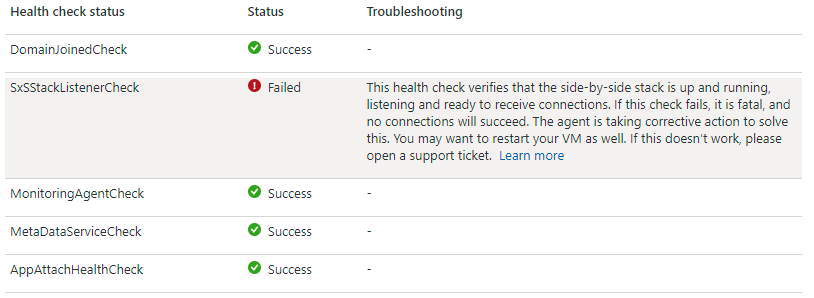
Request anyone to help me on resolve this issue.
' cx='32' cy='32' r='32' /%3E%3Ctext x='50%25' y='55%25' dominant-baseline='middle' text-anchor='middle' fill='%23FFF' %3EKM%3C/text%3E%3C/svg%3E)
Can you please share which VM OS image are you using? Is it Windows 10 multi-session image?
I am seeing same thing but tried your solution without any luck. Weird part it is happening to Azure Market place image (didn't even customized it).
' cx='32' cy='32' r='32' /%3E%3Ctext x='50%25' y='55%25' dominant-baseline='middle' text-anchor='middle' fill='%23FFF' %3EHL%3C/text%3E%3C/svg%3E)
I got the same issue, I installed Win11 22H2 by myself, after installed AVD agent and boot loader, the SxSStackListenerCheck always failed, and I have another VM by using Azure VM VHD without any problems.
So I did the comparation about firewall configurations, from Azure VM VHD the firewall configuration of Remote Desktop was enabled which means the Remote Desktop function was enabled, and I try to enable Remote Desktop functionality in my own OS, then the SxSStackListenerCheck was passed.
So I did the comparation about firewall configurations, from Azure VM VHD the firewall configuration of Remote Desktop was enabled which means the Remote Desktop function was enabled, and I try to enable Remote Desktop functionality in my own OS, then the SxSStackListenerCheck was passed.
Hope this helps.
' cx='32' cy='32' r='32' /%3E%3Ctext x='50%25' y='55%25' dominant-baseline='middle' text-anchor='middle' fill='%23FFF' %3EKB%3C/text%3E%3C/svg%3E)
Howard Lin (Beyondsoft) Please help.
I'm facing "AVD Session Host is unavailable | SxSStackListenerCheck - Failed". I found your statement helpful. What exactly do we need to do?
Do we have to enable the Remote Desktop function like this?
And what changes do we need to make to the firewall to pass SxSStackListenerCheck error?
I checked with the internal team. If you upload Windows 10 MS image yourself, you need to reboot before using it.
The Marketplace images do not have this issue as when we put it on the marketplace we reboot it once, before publishing it. This is currently by design because Win10MS is a virtual edition of client enterprise.
If that's not the case with you, few customers also shared they had the issue resolved after disabling Windows Firewall.
Please let me know if any of this applies to you or if you are still seeing the issue and I will further investigate. Thanks.
i will try rebooting before publishing it and confirm on the outcome.
' cx='32' cy='32' r='32' /%3E%3Ctext x='50%25' y='55%25' dominant-baseline='middle' text-anchor='middle' fill='%23FFF' %3EVB%3C/text%3E%3C/svg%3E)
This issue continues till date.
' cx='32' cy='32' r='32' /%3E%3Ctext x='50%25' y='55%25' dominant-baseline='middle' text-anchor='middle' fill='%23FFF' %3EPD%3C/text%3E%3C/svg%3E)
I managed to fix it on a computer but im not sure which of theses steps actually fixed it. So you may try them.
After reboot the RDP-SXS was showing up..
