Azure Virtual Machines
An Azure service that is used to provision Windows and Linux virtual machines.
This browser is no longer supported.
Upgrade to Microsoft Edge to take advantage of the latest features, security updates, and technical support.
' cx='32' cy='32' r='32' /%3E%3Ctext x='50%25' y='55%25' dominant-baseline='middle' text-anchor='middle' fill='%23FFF' %3ESP%3C/text%3E%3C/svg%3E)
When trying to install Windows Server HPC Pack 2019 Refreshed into a single head node (no high availability) configuration on Windows Server 2016, I get the following error during installation of the server components:
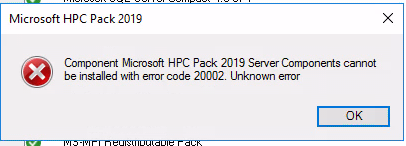
The chainer log is full of errors like this:
11.29.12.186 - Failed to initialize HA Storage database: System.AggregateException: One or more errors occurred. ---> System.InvalidOperationException: Error occured when setting data entry: System.Data.SqlClient.SqlException (0x80131904): Error converting data type nvarchar to datetime.
at System.Data.SqlClient.SqlConnection.OnError(SqlException exception, Boolean breakConnection, Action1 wrapCloseInAction) at System.Data.SqlClient.TdsParser.ThrowExceptionAndWarning(TdsParserStateObject stateObj, Boolean callerHasConnectionLock, Boolean asyncClose) at System.Data.SqlClient.TdsParser.TryRun(RunBehavior runBehavior, SqlCommand cmdHandler, SqlDataReader dataStream, BulkCopySimpleResultSet bulkCopyHandler, TdsParserStateObject stateObj, Boolean& dataReady) at System.Data.SqlClient.SqlCommand.FinishExecuteReader(SqlDataReader ds, RunBehavior runBehavior, String resetOptionsString, Boolean isInternal, Boolean forDescribeParameterEncryption, Boolean shouldCacheForAlwaysEncrypted) at System.Data.SqlClient.SqlCommand.CompleteAsyncExecuteReader(Boolean isInternal, Boolean forDescribeParameterEncryption) at System.Data.SqlClient.SqlCommand.InternalEndExecuteNonQuery(IAsyncResult asyncResult, String endMethod, Boolean isInternal) at System.Data.SqlClient.SqlCommand.EndExecuteNonQueryInternal(IAsyncResult asyncResult) at System.Data.SqlClient.SqlCommand.EndExecuteNonQueryAsync(IAsyncResult asyncResult) at System.Threading.Tasks.TaskFactory1.FromAsyncCoreLogic(IAsyncResult iar, Func2 endFunction, Action1 endAction, Task1 promise, Boolean requiresSynchronization) \--- End of stack trace from previous location where exception was thrown --- at System.Runtime.ExceptionServices.ExceptionDispatchInfo.Throw() at System.Runtime.CompilerServices.TaskAwaiter.HandleNonSuccessAndDebuggerNotification(Task task) at Microsoft.Hpc.HighAvailabilityModule.Storage.Client.SQLStorageMembershipClient.<SetDataEntryAsync>d__30.MoveNext() ClientConnectionId:4bad1edc-3402-4401-9304-072070c87032 Error Number:8114,State:5,Class:16 at Microsoft.Hpc.HighAvailabilityModule.Storage.Client.SQLStorageMembershipClient.<SetDataEntryAsync>d__30.MoveNext() \--- End of stack trace from previous location where exception was thrown --- at System.Runtime.ExceptionServices.ExceptionDispatchInfo.Throw() at System.Runtime.CompilerServices.TaskAwaiter.HandleNonSuccessAndDebuggerNotification(Task task) at Microsoft.Hpc.HighAvailabilityModule.Storage.Client.SQLStorageMembershipClient.<SetStringAsync>d__32.MoveNext() \--- End of stack trace from previous location where exception was thrown --- at System.Runtime.ExceptionServices.ExceptionDispatchInfo.Throw() at Microsoft.Hpc.SqlReliableRegistry.<SetValueAsync>d__101.MoveNext()
--- End of inner exception stack trace ---
at System.Threading.Tasks.Task.WaitAll(Task[] tasks, Int32 millisecondsTimeout, CancellationToken cancellationToken)
at Microsoft.Hpc.Setup.Chainer.InstallEngine.HpcServerInstallableItem.InitializeHAStorage()
Any advice?

Running "CleanFabric.ps1" solved the installation problem for many users.
Here is a thread as well which discusses the same issue and you can try out some troubleshooting steps from this and see if that helps you to sort the Issue.
HPC Pack 2016 Update 2 installation error 20002, can not install server components after uninstalling HPC Pack 2016
https://social.microsoft.com/Forums/en-US/4f46bb34-6ac4-4519-8e06-37fd7ec66f5c/hpc-pack-2016-update-2-installation-error-20002-can-not-install-server-components-after-uninstall?forum=windowshpcitpros
Hope this resolves your Query!!
--------
--If the reply is helpful, please Upvote and Accept it as an answer--
Hi,
I already tried to run CleanFabric.ps1 before asking this question. Output was this:
Registry key is already removed.
FabricHostSvc is already removed.
FabricInstallerSvc is already removed.
FabricRoot not present.
Fabric is already uninstalled.
Sorry I did not mention that. It did not fix the issue.
There was indeed an old installation of HPC pack on the system, which was never used. I suspect it got corrupted when the server was migrated to a different domain. But as it was never used, this was also not discovered at that time. The old installation was also single head node configuration. If I understood correctly, the fabric is only really used by HPC for configurations involving multiple head nodes? I did not see any of the fabric processes running on the system that were mentioned in the linked thread.
' cx='32' cy='32' r='32' /%3E%3Ctext x='50%25' y='55%25' dominant-baseline='middle' text-anchor='middle' fill='%23FFF' %3ESP%3C/text%3E%3C/svg%3E)
Hi Saarimaa
I faced same issue.
Did you resolve this problem?
' cx='32' cy='32' r='32' /%3E%3Ctext x='50%25' y='55%25' dominant-baseline='middle' text-anchor='middle' fill='%23FFF' %3EYS%3C/text%3E%3C/svg%3E)
Hi @Saarimaa, Pekka , @Sangchul Park ,
This looks a known issue in HPC Pack 2019 which has been fixed in HPC Pack 2019 Update 1. Please check it out.
Regards,
Yutong Sun
