Exchange Online
A cloud-based service included in Microsoft 365, delivering scalable messaging and collaboration features with simplified management and automatic updates.
This browser is no longer supported.
Upgrade to Microsoft Edge to take advantage of the latest features, security updates, and technical support.

Hello,
I would like to create a custom "Contact Address Book" to create all external users infor and make this address book available for the entire organization. Can you please advise if this is possible ?
I dont want to add those users as guest users . I just want to store the contacts information in our "Custom Address Book " Ex: External Users.
PFA 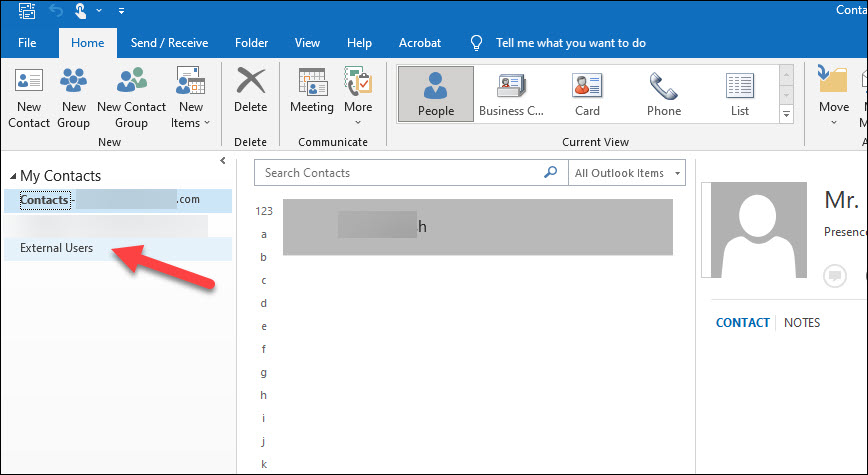

Two different options. You can populate them as contacts in the GAL or even have a separate Address List that can be selected from the Address Book dialog. More info about this scenario: https://v4.hkg1.meaqua.org/en-us/exchange/address-books/address-lists/address-lists
Alternatively, you can populate them as items within a Contacts folder, which you can then share with whoever needs access. Or even populate them directly in user's mailboxes. For that, you will need a programmatic solution, based on the EWS or Graph APIs. Here's a sample one: https://github.com/gscales/Powershell-Scripts/tree/master/EWSContacts
Michev - thank you for your response. Just to be clear here are the steps I'm doing in my MS Office Outlook 2016
Select "People"> Under "My Contacts" > Contacts > Created a new sub Folder name "External Users" and in this folder i'm adding the external contacts .
I dont want to give access or license to those users just need to them in the subfolder entering their Full name and Email for our quick reference purpose. And this folder should be accessible to the entire org.
Please advise which procedure i need to follow ?
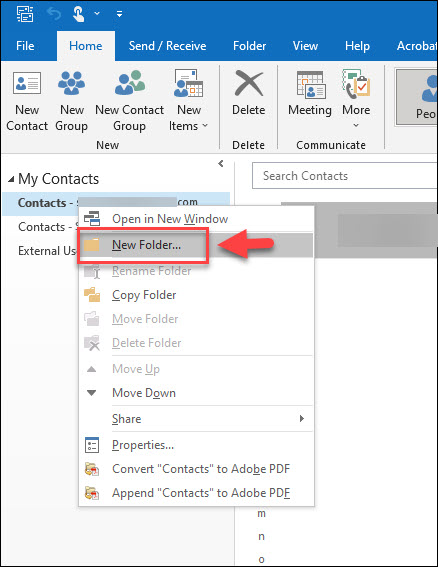
You can simply "share" this folder with people within your organization. It will be up to you to populate and maintain the list, so you will be more or less a "single point of failure" - this is why some organizations choose to use a more "centralized" approach such as putting the contacts in the GAL/separate Address list. Which is not to say it cannot work, in fact you can easily give it a try by creating some "test" contacts and sharing the folder, then see whether the experience is satisfactory for both you as the "maintainer" and all the folks who will be "consuming" this data.
' cx='32' cy='32' r='32' /%3E%3Ctext x='50%25' y='55%25' dominant-baseline='middle' text-anchor='middle' fill='%23FFF' %3EAX%3C/text%3E%3C/svg%3E)
Hi @SR VSP ,
Agree with they have replied all.
You could run below to create an address list that contains all external users.
New-AddressList -Name "contact" -IncludedRecipients MailContacts
Here’s a document for you reference
Manage address lists in Exchange Online | Microsoft Learn
If the answer is helpful, please click "Accept Answer" and kindly upvote it. If you have extra questions about this answer, please click "Comment".
Note: Please follow the steps in our documentation to enable e-mail notifications if you want to receive the related email notification for this thread.
Hi @SR VSP ,
It's been a while, is there any update?
If the above suggestion helps, please click “Accept as answer” to mark helpful reply as an answer. Your action would be helpful to other users who encounter the same issue and read this thread.
' cx='32' cy='32' r='32' /%3E%3Ctext x='50%25' y='55%25' dominant-baseline='middle' text-anchor='middle' fill='%23FFF' %3ETY%3C/text%3E%3C/svg%3E)
Hi
Do you mean if you want to add an external contact in the company's contact list? if yes, you may refer this link https://dptechgroup.com/office-365-support/add-external-contact-office-365/ .
Tina thank you for your response can you please see my comment for your reference
' cx='32' cy='32' r='32' /%3E%3Ctext x='50%25' y='55%25' dominant-baseline='middle' text-anchor='middle' fill='%23FFF' %3EFM%3C/text%3E%3C/svg%3E)
How to create an address label set us
How to create an address label set up.
