Note
Access to this page requires authorization. You can try signing in or changing directories.
Access to this page requires authorization. You can try changing directories.
In Microsoft Defender for Cloud, you can exempt protected resources from Defender for Cloud security recommendations. This article describes how to review and work with exempted resources.
Review exempted resources in the portal
When you exempt a resource, it doesn't prompt security recommendations. You can review and manage exempted resources in the Defender for Cloud portal.
Review exempted resources on the Recommendations page
Sign in to the Azure portal.
Go to Defender for Cloud > Recommendations.
Select Recommendation status.
Select Exempted.
Select Apply.
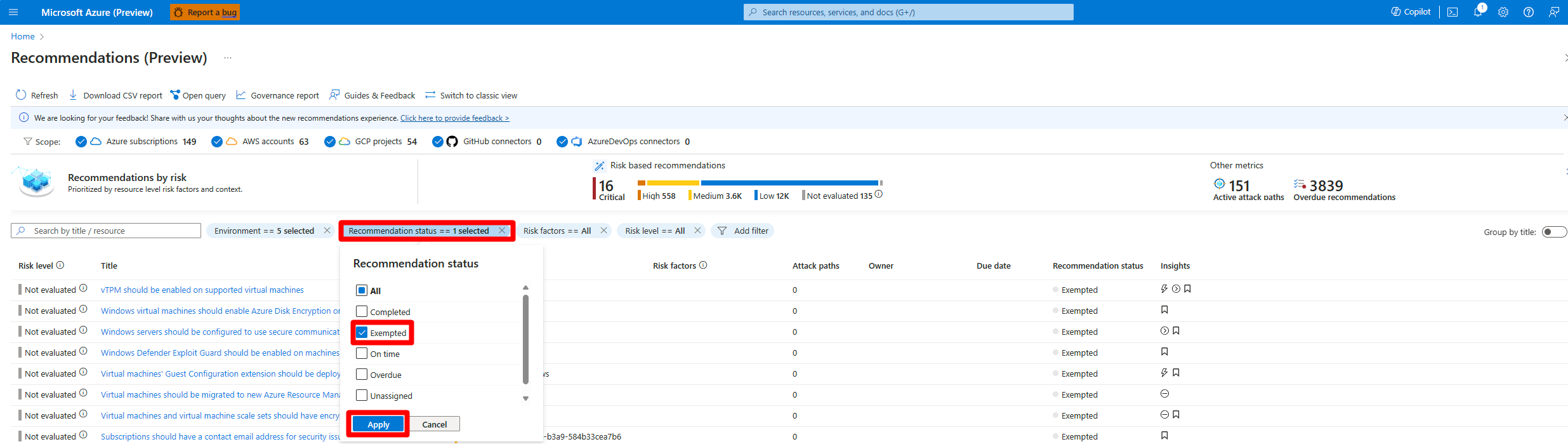
Select a resource to review it.
Review exempted resources on the Inventory page
Sign in to the Azure portal.
Go to Defender for Cloud > Inventory.
Select Add filter.
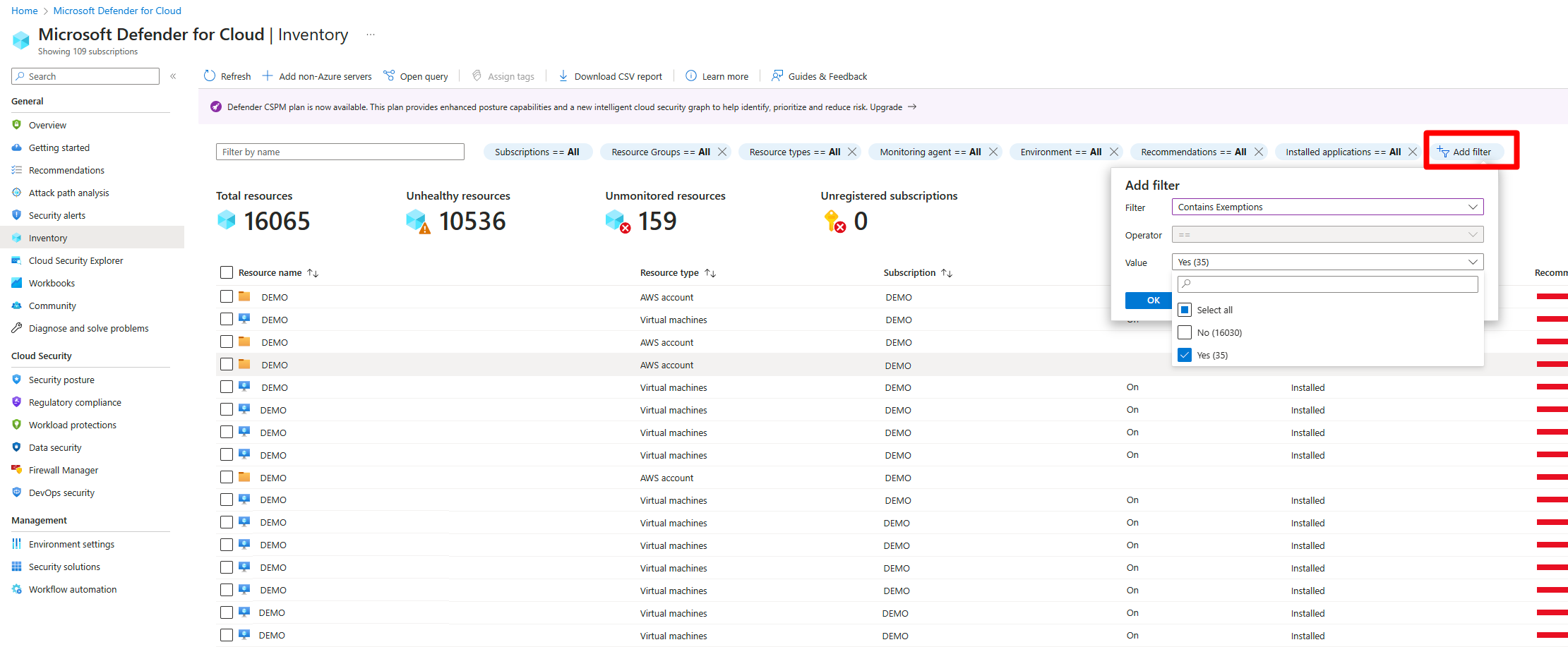
Select Contains exemptions.
Select Yes.
Select OK.
Review exempted resources with Azure Resource Graph
Azure Resource Graph (ARG) provides instant access to resource information across your cloud environments with robust filtering, grouping, and sorting capabilities. You can quickly and easily query information by using Kusto Query Language (KQL).
To view all recommendations that have exemption rules:
In the Recommendations page, select Open query.
Enter the following query and select Run query.
securityresources
| where type == "microsoft.security/assessments"
// Get recommendations in useful format
| project
['TenantID'] = tenantId,
['SubscriptionID'] = subscriptionId,
['AssessmentID'] = name,
['DisplayName'] = properties.displayName,
['ResourceType'] = tolower(split(properties.resourceDetails.Id,"/").[7]),
['ResourceName'] = tolower(split(properties.resourceDetails.Id,"/").[8]),
['ResourceGroup'] = resourceGroup,
['ContainsNestedRecom'] = tostring(properties.additionalData.subAssessmentsLink),
['StatusCode'] = properties.status.code,
['StatusDescription'] = properties.status.description,
['PolicyDefID'] = properties.metadata.policyDefinitionId,
['Description'] = properties.metadata.description,
['RecomType'] = properties.metadata.assessmentType,
['Remediation'] = properties.metadata.remediationDescription,
['Severity'] = properties.metadata.severity,
['Link'] = properties.links.azurePortal
| where StatusDescription contains "Exempt"
Get a notification when users create exemptions
To keep track of how users exempt resources from recommendations, we created an Azure Resource Manager template (ARM template). The template deploys a logic app playbook and all necessary API connections to notify you when an exemption is created.
- Learn more about the playbook by reading the blog post How to keep track of Resource Exemptions in Microsoft Defender for Cloud.
- Locate the ARM template in the Microsoft Defender for Cloud GitHub repository.
- Use this automated process to deploy all components.