Observação
O acesso a essa página exige autorização. Você pode tentar entrar ou alterar diretórios.
O acesso a essa página exige autorização. Você pode tentar alterar os diretórios.
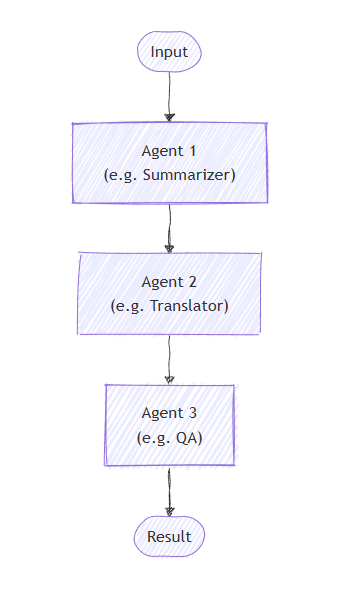
Na orquestração sequencial, os agentes são dispostos em formato de pipeline. Cada agente processa a tarefa por sua vez, passando sua saída para o próximo agente na sequência. Isso é ideal para fluxos de trabalho em que cada etapa se baseia na anterior, como revisão de documentos, pipelines de processamento de dados ou raciocínio de vários estágios.
O que você vai aprender
- Como criar um pipeline sequencial de agentes
- Como encadear agentes onde cada um se baseia na saída anterior
- Como misturar agentes com executores personalizados para tarefas especializadas
- Como acompanhar o fluxo de conversa por meio do pipeline
Definir seus agentes
Na orquestração sequencial, os agentes são organizados em um pipeline em que cada agente processa a tarefa por sua vez, passando a saída para o próximo agente na sequência.
Configurar o cliente do Azure OpenAI
using System;
using System.Collections.Generic;
using System.Linq;
using System.Threading.Tasks;
using Azure.AI.OpenAI;
using Azure.Identity;
using Microsoft.Agents.AI.Workflows;
using Microsoft.Extensions.AI;
using Microsoft.Agents.AI;

// 1) Set up the Azure OpenAI client
var endpoint = Environment.GetEnvironmentVariable("AZURE_OPENAI_ENDPOINT") ??
    throw new InvalidOperationException("AZURE_OPENAI_ENDPOINT is not set.");
var deploymentName = Environment.GetEnvironmentVariable("AZURE_OPENAI_DEPLOYMENT_NAME") ?? "gpt-4o-mini";
var client = new AzureOpenAIClient(new Uri(endpoint), new AzureCliCredential())
    .GetChatClient(deploymentName)
    .AsIChatClient();
Crie agentes especializados que funcionarão em sequência:
// 2) Helper method to create translation agents
static ChatClientAgent GetTranslationAgent(string targetLanguage, IChatClient chatClient) =>
    new(chatClient,
        $"You are a translation assistant who only responds in {targetLanguage}. Respond to any " +
        $"input by outputting the name of the input language and then translating the input to {targetLanguage}.");

// Create translation agents for sequential processing
var translationAgents = (from lang in (string[])["French", "Spanish", "English"]
                         select GetTranslationAgent(lang, client));
Configurar a orquestração sequencial
Crie o fluxo de trabalho usando AgentWorkflowBuilder:
// 3) Build sequential workflow
var workflow = AgentWorkflowBuilder.BuildSequential(translationAgents);
Executar o fluxo de trabalho sequencial
Execute o fluxo de trabalho e processe os eventos:
// 4) Run the workflow
var messages = new List<ChatMessage> { new(ChatRole.User, "Hello, world!") };

StreamingRun run = await InProcessExecution.StreamAsync(workflow, messages);
await run.TrySendMessageAsync(new TurnToken(emitEvents: true));

List<ChatMessage> result = new();
await foreach (WorkflowEvent evt in run.WatchStreamAsync().ConfigureAwait(false))
{
    if (evt is AgentRunUpdateEvent e)
    {
        Console.WriteLine($"{e.ExecutorId}: {e.Data}");
    }
    else if (evt is WorkflowOutputEvent outputEvt)
    {
        result = (List<ChatMessage>)outputEvt.Data!;
        break;
    }
}

// Display final result
foreach (var message in result)
{
    Console.WriteLine($"{message.Role}: {message.Content}");
}
Saída de exemplo
French_Translation: User: Hello, world!
French_Translation: Assistant: English detected. Bonjour, le monde !
Spanish_Translation: Assistant: French detected. ¡Hola, mundo!
English_Translation: Assistant: Spanish detected. Hello, world!
Conceitos Principais
- Processamento Sequencial: cada agente processa a saída do agente anterior em ordem
- AgentWorkflowBuilder.BuildSequential(): cria um fluxo de trabalho de pipeline de uma coleção de agentes
- ChatClientAgent: representa um agente apoiado por um cliente de chat com instruções específicas
- StreamingRun: fornece execução em tempo real com recursos de streaming de eventos
-
Tratamento de eventos: monitorar o progresso do agente através
AgentRunUpdateEvente a conclusão atravésWorkflowOutputEvent
Na orquestração sequencial, cada agente processa a tarefa sequencialmente, com a saída fluindo de um agente para o próximo. Vamos começar definindo agentes para um processo de dois estágios:
from agent_framework.azure import AzureChatClient
from azure.identity import AzureCliCredential

# 1) Create agents using AzureChatClient
chat_client = AzureChatClient(credential=AzureCliCredential())

writer = chat_client.create_agent(
    instructions=(
        "You are a concise copywriter. Provide a single, punchy marketing sentence based on the prompt."
    ),
    name="writer",
)

reviewer = chat_client.create_agent(
    instructions=(
        "You are a thoughtful reviewer. Give brief feedback on the previous assistant message."
    ),
    name="reviewer",
)
Configurar a orquestração sequencial
A SequentialBuilder classe cria um pipeline em que os agentes processam tarefas em ordem. Cada agente vê o histórico completo da conversa e adiciona sua resposta:
from agent_framework import SequentialBuilder

# 2) Build sequential workflow: writer -> reviewer
workflow = SequentialBuilder().participants([writer, reviewer]).build()
Executar o fluxo de trabalho sequencial
Execute o fluxo de trabalho e colete a conversa final mostrando a contribuição de cada agente:
from agent_framework import ChatMessage, WorkflowOutputEvent

# 3) Run and print final conversation
output_evt: WorkflowOutputEvent | None = None
async for event in workflow.run_stream("Write a tagline for a budget-friendly eBike."):
    if isinstance(event, WorkflowOutputEvent):
        output_evt = event

if output_evt:
    print("===== Final Conversation =====")
    messages: list[ChatMessage] | Any = output_evt.data
    for i, msg in enumerate(messages, start=1):
        name = msg.author_name or ("assistant" if msg.role == Role.ASSISTANT else "user")
        print(f"{'-' * 60}\n{i:02d} [{name}]\n{msg.text}")
Saída de exemplo
===== Final Conversation =====
------------------------------------------------------------
01 [user]
Write a tagline for a budget-friendly eBike.
------------------------------------------------------------
02 [writer]
Ride farther, spend less—your affordable eBike adventure starts here.
------------------------------------------------------------
03 [reviewer]
This tagline clearly communicates affordability and the benefit of extended travel, making it
appealing to budget-conscious consumers. It has a friendly and motivating tone, though it could
be slightly shorter for more punch. Overall, a strong and effective suggestion!
Avançado: combinando agentes com executores personalizados
A orquestração sequencial dá suporte à combinação de agentes com executores personalizados para processamento especializado. Isso é útil quando você precisa de uma lógica personalizada que não exija uma LLM:
Definir um Executor Personalizado
from agent_framework import Executor, WorkflowContext, handler
from agent_framework import ChatMessage, Role

class Summarizer(Executor):
    """Simple summarizer: consumes full conversation and appends an assistant summary."""

    @handler
    async def summarize(
        self,
        conversation: list[ChatMessage],
        ctx: WorkflowContext[list[ChatMessage]]
    ) -> None:
        users = sum(1 for m in conversation if m.role == Role.USER)
        assistants = sum(1 for m in conversation if m.role == Role.ASSISTANT)
        summary = ChatMessage(
            role=Role.ASSISTANT,
            text=f"Summary -> users:{users} assistants:{assistants}"
        )
        await ctx.send_message(list(conversation) + [summary])
Criar um fluxo de trabalho sequencial misto
# Create a content agent
content = chat_client.create_agent(
    instructions="Produce a concise paragraph answering the user's request.",
    name="content",
)

# Build sequential workflow: content -> summarizer
summarizer = Summarizer(id="summarizer")
workflow = SequentialBuilder().participants([content, summarizer]).build()
Saída de exemplo com Executador Customizado
------------------------------------------------------------
01 [user]
Explain the benefits of budget eBikes for commuters.
------------------------------------------------------------
02 [content]
Budget eBikes offer commuters an affordable, eco-friendly alternative to cars and public transport.
Their electric assistance reduces physical strain and allows riders to cover longer distances quickly,
minimizing travel time and fatigue. Budget models are low-cost to maintain and operate, making them accessible
for a wider range of people. Additionally, eBikes help reduce traffic congestion and carbon emissions,
supporting greener urban environments. Overall, budget eBikes provide cost-effective, efficient, and
sustainable transportation for daily commuting needs.
------------------------------------------------------------
03 [assistant]
Summary -> users:1 assistants:1
Conceitos Principais
- Contexto Compartilhado: cada participante recebe o histórico completo da conversa, incluindo todas as mensagens anteriores
-
Order Matters: Agentes são executados estritamente na ordem especificada na
participants()lista - Participantes flexíveis: você pode misturar agentes e executores personalizados em qualquer ordem
- Fluxo de Conversa: cada agente/executor acrescenta à conversa, criando um diálogo completo