Hi @Anneliese Jennings,
Thank you so much for sharing those additional details. From what you’ve described, this issue is affecting both the Teams desktop app and the web version, and it impacts everyone in your district. That strongly indicates this is not an isolated case but rather something happening on a broader scale.
I’ve also noticed a few other users reporting similar behavior, which suggests it could be related to a backend issue, possibly with Giphy’s service or another component that needs deeper investigation. To verify, I checked the Service Health Dashboard, which is the tool in the Microsoft 365 Admin Center that shows real-time service status and incidents. However, at the moment, there are no official advisories or incidents posted by Microsoft regarding this problem.
Because the product engineering team does not monitor posts here, and as a forum moderator I don’t have the ability to escalate or make changes directly, the best next step would be to report this issue through the Service Health portal. Here’s how you can do that: Go to Microsoft 365 Admin Center > Health > Service Health > Report an issue and provide a clear description of the problem. 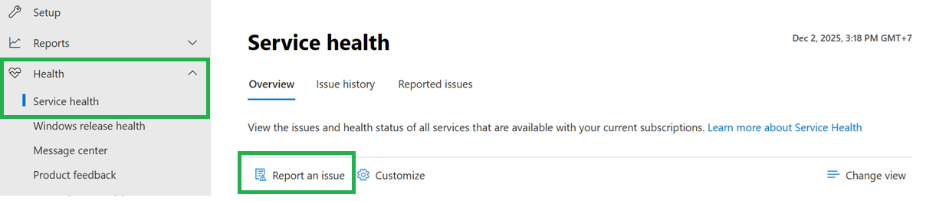
Reporting the issue ensures that the relevant Microsoft team can log it, gather similar reports, investigate the root cause, and work toward a resolution, which may include updates in upcoming releases.
In case this problem is significantly disrupting workflows in your organization, you can also open a support request directly. Once the ticket is submitted, the appropriate team will review it, confirm the scope, and begin remediation steps. Opening a support ticket, on the other hand, is more focused on providing immediate help for your specific tenant, while reporting through Service Health helps Microsoft track and address the issue at a broader service level.
Note: All of the actions mentioned above require admin permissions. If you are an end user, please contact your IT administrator to perform these steps on your behalf.
Finally, I believe many other users in the community might be experiencing the same issue but aren’t sure where to report it or get help. If you find this answer helpful, please consider clicking “Accept Answer” on this post. Doing so will pin it to the top, making it easier for others to find and consolidate feedback. This small action goes a long way in helping the community.
Thank you again for your patience and understanding. If you have any further questions or need additional guidance, please feel free to reply here, I’ll be happy to assist within my scope.
Note: Please follow the steps in our documentation to enable e-mail notifications if you want to receive the related email notification for this thread.
' cx='32' cy='32' r='32' /%3E%3Ctext x='50%25' y='55%25' dominant-baseline='middle' text-anchor='middle' fill='%23FFF' %3EAJ%3C/text%3E%3C/svg%3E)

' cx='32' cy='32' r='32' /%3E%3Ctext x='50%25' y='55%25' dominant-baseline='middle' text-anchor='middle' fill='%23FFF' %3ERK%3C/text%3E%3C/svg%3E)
' cx='32' cy='32' r='32' /%3E%3Ctext x='50%25' y='55%25' dominant-baseline='middle' text-anchor='middle' fill='%23FFF' %3EHJ%3C/text%3E%3C/svg%3E)
' cx='32' cy='32' r='32' /%3E%3Ctext x='50%25' y='55%25' dominant-baseline='middle' text-anchor='middle' fill='%23FFF' %3ESF%3C/text%3E%3C/svg%3E)
' cx='32' cy='32' r='32' /%3E%3Ctext x='50%25' y='55%25' dominant-baseline='middle' text-anchor='middle' fill='%23FFF' %3EJN%3C/text%3E%3C/svg%3E)
' cx='32' cy='32' r='32' /%3E%3Ctext x='50%25' y='55%25' dominant-baseline='middle' text-anchor='middle' fill='%23FFF' %3ERL%3C/text%3E%3C/svg%3E)
' cx='32' cy='32' r='32' /%3E%3Ctext x='50%25' y='55%25' dominant-baseline='middle' text-anchor='middle' fill='%23FFF' %3EE%3C/text%3E%3C/svg%3E)
' cx='32' cy='32' r='32' /%3E%3Ctext x='50%25' y='55%25' dominant-baseline='middle' text-anchor='middle' fill='%23FFF' %3EJQ%3C/text%3E%3C/svg%3E)
' cx='32' cy='32' r='32' /%3E%3Ctext x='50%25' y='55%25' dominant-baseline='middle' text-anchor='middle' fill='%23FFF' %3EJ%3C/text%3E%3C/svg%3E)
' cx='32' cy='32' r='32' /%3E%3Ctext x='50%25' y='55%25' dominant-baseline='middle' text-anchor='middle' fill='%23FFF' %3ESL%3C/text%3E%3C/svg%3E)
' cx='32' cy='32' r='32' /%3E%3Ctext x='50%25' y='55%25' dominant-baseline='middle' text-anchor='middle' fill='%23FFF' %3EM%3C/text%3E%3C/svg%3E)
' cx='32' cy='32' r='32' /%3E%3Ctext x='50%25' y='55%25' dominant-baseline='middle' text-anchor='middle' fill='%23FFF' %3EAS%3C/text%3E%3C/svg%3E)