Azure Virtual Machines
An Azure service that is used to provision Windows and Linux virtual machines.
This browser is no longer supported.
Upgrade to Microsoft Edge to take advantage of the latest features, security updates, and technical support.
' cx='32' cy='32' r='32' /%3E%3Ctext x='50%25' y='55%25' dominant-baseline='middle' text-anchor='middle' fill='%23FFF' %3ESZ%3C/text%3E%3C/svg%3E)
OS Provisioning for VM '****' did not finish in the allotted time. This error occurred too many times consecutively from image 'ifca-image'. Make sure the image has been properly prepared (generalized).
Deleting and recreating the virtual machine may resolve the issue.
' cx='32' cy='32' r='32' /%3E%3Ctext x='50%25' y='55%25' dominant-baseline='middle' text-anchor='middle' fill='%23FFF' %3EMD%3C/text%3E%3C/svg%3E)
Hello @shijin zen
Thank you for contacting us about the VM issue.
Thanks,
Manish Deshpande
' cx='32' cy='32' r='32' /%3E%3Ctext x='50%25' y='55%25' dominant-baseline='middle' text-anchor='middle' fill='%23FFF' %3EJH%3C/text%3E%3C/svg%3E)
Hello @shijin zen
Thanks for reaching out to Q/A regarding OS Provisioning issue.
Why do provisioning failures occur?
Commonly, provisioning failures can happen for multiple reasons, such as:
Missing provisioning /incorrectly configured agent
To resolve the issue. Could you please follow below steps:
1.Ensure the Image is Generalized Correctly:
Check the generalization process: Windows VMs: Run Sysprep inside the VM before capture:
C:\Windows\System32\Sysprep\Sysprep.exe /generalize /shutdown /oobe
Linux VMs: Run the following command, and then shut down the VM:
sudo waagent -deprovision+user -force
After generalization and shutdown, you can create a managed image from the VM using the Azure portal or CLI.
Reference: https://v4.hkg1.meaqua.org/en-us/azure/virtual-machines/capture-image-resource
https://v4.hkg1.meaqua.org/en-us/azure/virtual-machines/linux/create-upload-generic
2.Ensure the Azure VM Agent is installed and updated before generalization, as provisioning depends on it.
3.Delete and Recreate the VM
This document talks in detail about the OS Provisioning errors and troubleshooting: https://v4.hkg1.meaqua.org/en-us/troubleshoot/azure/virtual-machines/troubleshoot-deployment-new-vm-linux#provisioning-troubleshooting
This document has the error causes mentioned.
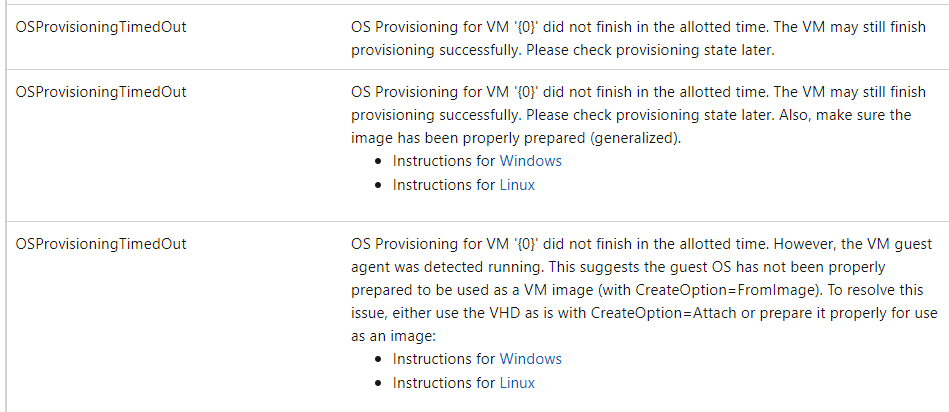
Recovery options:
If you have a snapshot, backup, or OS disk before generalization, → create a new VM from that disk.
If the VM was generalized and deleted without backup → unfortunately it is not possible to recover; you'll need to redeploy a new VM.
Reference: https://v4.hkg1.meaqua.org/pt-br/azure/virtual-machines/generalize
Similar threads for reference:
Hope this helps! Please let me know if you have any queries. If issue still persists, could you please check the private message and provide necessary details.
Hello @shijin zen
I wanted to check if the last response made sense. I’d be glad to assist further or explain anything in more detail and please accept as Yes and upvote if the answer is helpful so that it can help others in the community.
Hello @shijin zen
I wanted to check if the last response made sense. I’d be glad to assist further or explain anything in more detail and please accept as Yes and upvote if the answer is helpful so that it can help others in the community.
Hey Manish,
The VM with error above has been created from source VM. Someone else created the source VM. I am not sure if it's generalized before capturing. Is there a way to tell? it's Windows VM. And this VM has a lot of apps running. Please advise how to fix the issue without being recreated.
Hello @shijin zen
Thanks for sharing the error details. I reviewed the logs and the behavior of the VM, and here’s what’s actually happening behind the scenes.
Your virtual machine ended up in a “Failed” provisioning state because the OS provisioning process couldn’t complete in the time Azure allocates for that stage. In simple terms, the VM tried multiple times to set up the operating system from the image you provided, but something inside that image is blocking initialization. Azure stops the process when it sees repeated failures and marks the VM as failed.
If the image hasn’t been generalized (or the generalization wasn’t done cleanly), the provisioning agent inside the VM can’t complete its initial setup. That’s exactly when you see this type of failure.
This isn’t unusual it can happen with custom images when:
If it’s Windows:
If it’s Linux: Then Run
sudo waagent -deprovision+user
Thanks,
Manish Deshpande.

The error message indicates that the OS provisioning for the virtual machine 'new-CA-vm' did not finish in the allotted time, which suggests that there may be an issue with the image 'ifca-image'. To resolve this, ensure that the image has been properly prepared (generalized) before attempting to deploy the VM. You can refer to the instructions for preparing images for both Windows and Linux VMs:
If the issue persists, deleting and recreating the virtual machine might help resolve the problem.