Note
Access to this page requires authorization. You can try signing in or changing directories.
Access to this page requires authorization. You can try changing directories.
[This article is prerelease documentation and is subject to change.]
The meeting preparation feature in Microsoft 365 Copilot helps you enter every customer meeting with confidence and the right information. It shows AI-generated insights, CRM data, and recent communications into a single, easy-to-read view that is embedded alongside Sales agent chat interface, so you can quickly ask follow-up questions or dig deeper—without leaving your workflow.
Note
The meeting preparation feature is only available in the full-screen mode of Sales in Microsoft 365 Copilot Chat experience. It's not available when using Microsoft 365 Copilot Chat in Outlook, Word, PowerPoint, Excel, or Dynamics 365.
Important
- This is a preview feature.
- Preview features aren’t meant for production use and might have restricted functionality. These features are subject to supplemental terms of use, and are available before an official release so that customers can get early access and provide feedback.
License requirements
Specific licensing requirements apply when you use meeting preparation card Microsoft 365 Copilot. Learn more in Microsoft Product Terms.
View a meeting preparation card
For every upcoming sales meeting (a meeting with at least one external contact), the Sales app sends you a streamlined notification card in Teams. The meeting preparation card is also shown in Sales agent chat interface. Key features include:
- Timely delivery: The card is delivered by default 1 hour before the meeting. [Administrators can configure](configure-meeting-agent. md#configure-pre-meeting-preparation-notifications) this timing up to 7 days in advance.
- Essential meeting details: See the meeting title, time, and a direct link to join the meeting. It also shows account information, if available.
- Meeting highlights: See the top three topics to help you prepare quickly.
- Quick access: Includes a link to open meeting preparation details.
- Efficient design: The minimized card format lets you quickly scan the information and simplifies navigation across preparation content.
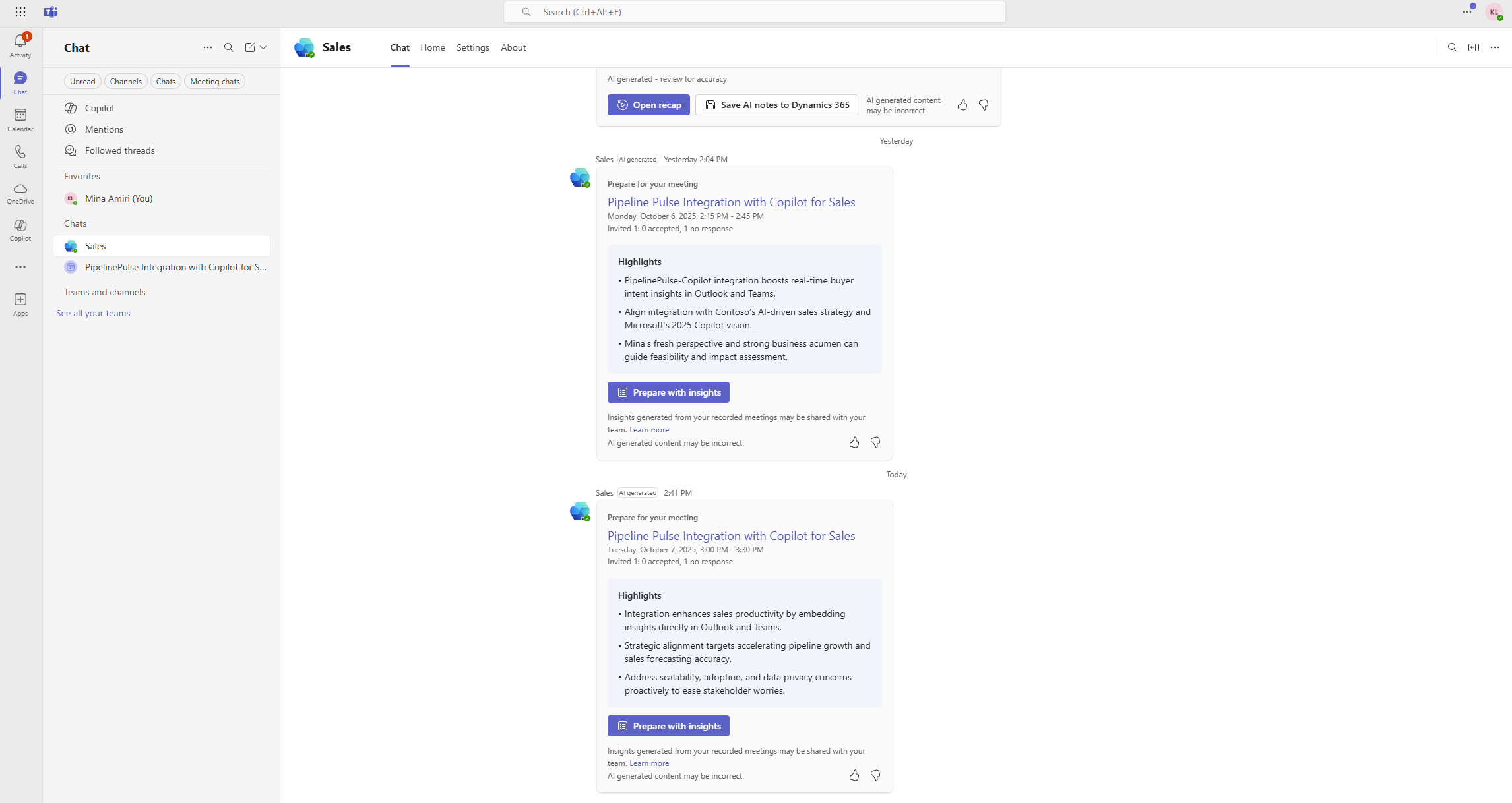
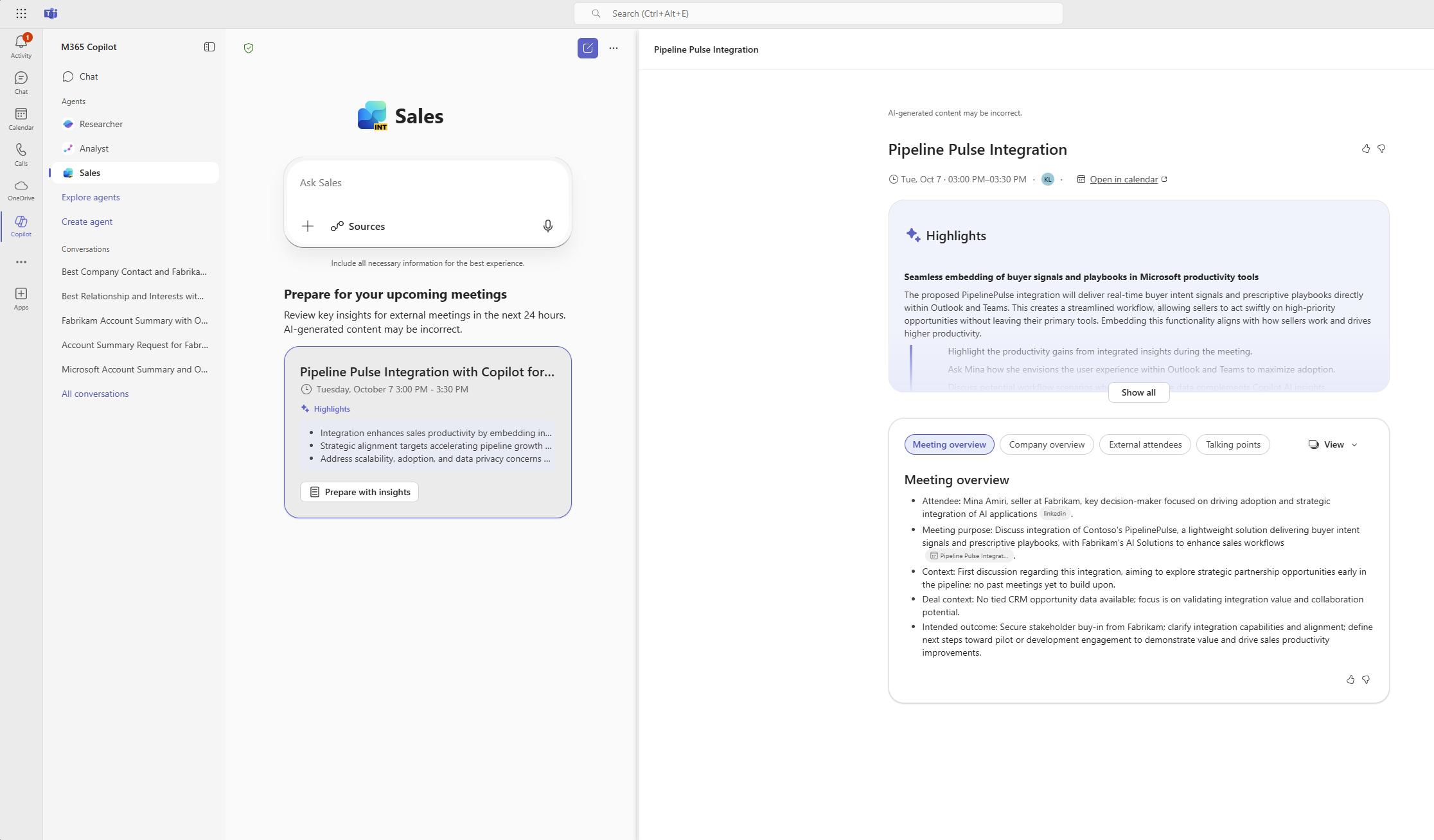
You can select Prepare with insights to open meeting preparation details alongside Sales agent chat interface. This helps you quickly ask follow-up questions, and dig deeper, without leaving your workflow. The meeting preparation details include:
Meeting information: View the meeting title, time, and a direct link to open the meeting in calendar.
Highlights: This section offers more detailed information on the topics featured in the meeting card. Each highlight includes relevant context and recommends actions tailored to your upcoming meeting.
CRM record summary: This section is displayed only if the meeting is linked to a CRM record such as an opportunity or account. It shows AI-generated summary of the record. Note that meeting can only be linked to a CRM record from the Sales pane in Outlook.
Customer communication: This section is displayed only if the meeting is connected to an opportunity. It shows insights from recent emails and meetings related to the linked CRM record. It may include insights from conversations organized by other team members for the same record, providing a complete view of past customer interactions. Note that insights are displayed only if enabled by your administrator. Learn more about the Customer communication card.
AI-generated insights: This section provides in-depth, AI-driven context to help you prepare for your meeting. It includes:
- Meeting overview: A summary of the meeting's purpose.
- Company overview: AI-generated highlights about the company. If no CRM record is linked, AI uses the domains of external attendees to infer the company. If there are multiple domains, AI selects the best match.
- External attendees: AI-enriched details about external participants, based on their email domains (not just CRM contacts).
- Talking points: Tailored to your role (for example, seller or executive), and may include:
- Strategic themes
- Icebreaker questions
- Discovery questions
- Potential use cases
- Likely objections
- Communication highlights (optional): An AI summary of previous team discussions, such as:
- What's going well
- What are the risks
- What's happening next
You can configure the view to show insights either in a card-based format or as a list. Select View and then choose Card or All in one.
Note
- On the left side, just below the Sales agent chat input box, you'll see a list of your upcoming meetings scheduled within the next 24 hours.
- Meeting preparation insights are generated automatically for all upcoming sales meetings.
- If you schedule a new meeting, it may take up to 20 minutes for insights to be generated and for the notification card to appear.
- Until insights are ready, meetings in the left panel are labelled as "insights not available". Once insights are available, the meeting entry updates to show the highlights.